
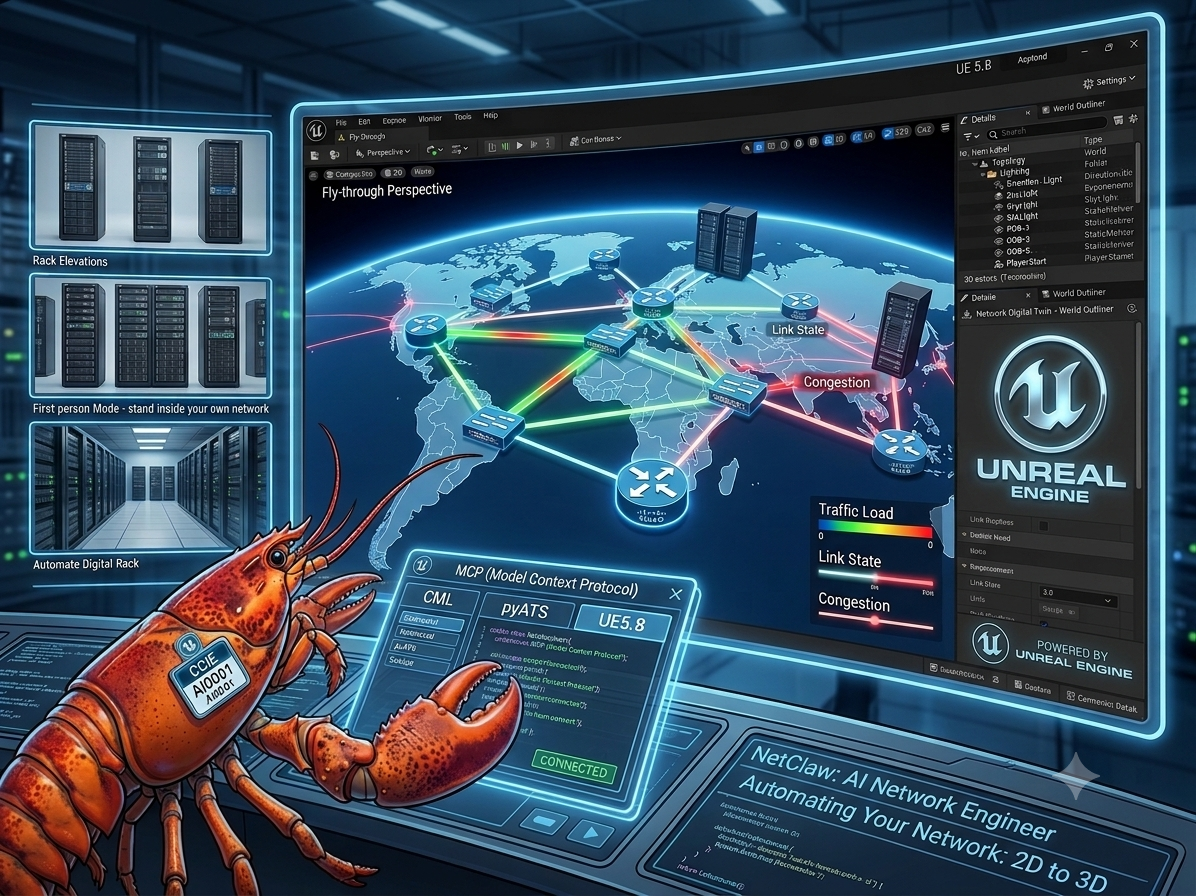
The Achievement
NetClaw — my AI network engineer — just gained a body. Not a metaphorical one. A literal, walkable, three-dimensional one, built inside Unreal Engine 5.8.
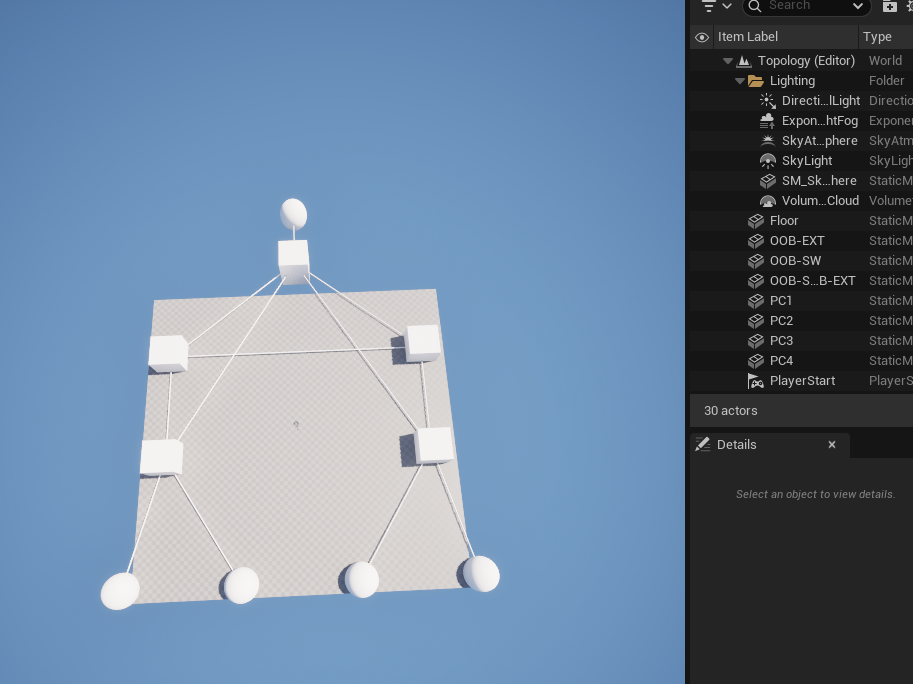
Here’s what that actually means: I pointed NetClaw at a real lab running in Cisco Modeling Labs (CML). NetClaw used pyATS to gather live device state from that lab — the routers, the switches, the links between them, their health. Then, using nothing but the Model Context Protocol (MCP) and Unreal Engine 5.8’s own built-in MCP server, NetClaw reconstructed that exact topology as a fully rendered 3D scene — devices as objects in space, links as glowing connections, colors mapped to device type and health, laid out automatically with a force-directed algorithm and centered on the map.
No human touched a single actor in the scene. No one dragged a node, ran a cable, or set a color. NetClaw talked to three separate systems — CML, pyATS, and Unreal Engine — over MCP, and built the world itself.
This is a new composable skill for NetClaw: ue5-network-viz. And it’s not a one-off demo — it’s a reusable pipeline. Any topology NetClaw can see through CML, pyATS, gNMI, SuzieQ, or any of its other network-data MCP servers can now be rendered as a living 3D scene in Unreal Engine.
Why This Matters — The Bigger Picture
Network diagrams have looked the same for 40 years: boxes and lines on a 2D canvas — a whiteboard, a Visio file, a NetBox topology view. They’re static the moment they’re drawn, and they go stale the moment someone racks a new switch or re-patches a link. We’ve been representing something inherently physical and spatial — racks, cables, rooms, buildings, campuses — as flat, lifeless diagrams.
That’s what changes here.
Once a network exists as real objects in 3D space instead of shapes on a page, a whole category of things becomes possible that was never possible with a flat diagram:
- Fly-throughs. Don’t squint at a topology export — fly through your network like a level in a game, camera gliding between core, distribution, and access layers.
- Live traffic flow visualization. Imagine packets rendered as moving light along the links, real interface utilization shown as flow intensity, congestion visibly building on a saturated trunk in real time.
- Color and light as telemetry. Device and interface health rendered as actual color and glow in a 3D scene instead of a row in a spreadsheet or a red dot on a dashboard.
- Rack and elevation views, to scale. Generate an accurate 3D rack elevation automatically from live inventory data — see exactly what’s mounted where, without opening a spreadsheet.
- Walkable wire maps. Every cable, every port, spatially accurate and traceable by literally walking along it.
- First-person exploration. Drop into first-person view and stand inside your own network — walk the server room, walk the campus backbone, walk a topology that doesn’t even physically exist yet because it’s still in a lab.
And critically — this doesn’t stop at lab environments. The exact same pipeline that rebuilt this CML lab as a 3D world can rebuild a real, production network the same way: pull live state from real devices, and render a true 3D digital twin of a real data center, campus, or site. Virtual labs and real infrastructure become the same kind of object once they’re described the same way — as data flowing through MCP into a 3D engine.
We are not far from the point where “monitoring the network” means literally walking through it.
For the Technically Curious — Hurdles Faced
I want to be upfront about something before diving into the technical details: this took longer than it should have, and it wasn’t because the integration itself was hard. It was because I was building this on a PC that started showing real instability under the combined load of Unreal Engine 5.8, live rendering, and an AI agent hammering it with MCP tool calls. This is a heavy workload — a full game engine, a live editor session, real-time actor spawning and transform updates, screenshot capture, all while a separate process (NetClaw) is issuing dozens of MCP calls per topology build. My machine crashed, repeatedly, mid-build, more than once wiping out an in-progress scene and forcing a full restart of both Unreal Engine and the session. If you attempt this yourself, budget real headroom on GPU and system stability — this is not a lightweight integration to run on marginal hardware.
Setup, Step by Step
For anyone who wants to reproduce this, here is the exact order that worked:
- Create an Epic Games account and install the Epic Games Launcher. This is the gate to everything else — Unreal Engine itself is distributed through the launcher, not as a standalone installer.
- Download and install Unreal Engine 5.8 through the launcher. This is a large install — allow real time and real disk space for it.
- Install the MCP Plugin — and note, there are two of them. Unreal Engine’s plugin ecosystem currently has more than one MCP-related plugin available; make sure you install the one that exposes the actual
ModelContextProtocolserver subsystem (the built-in MCP integration), not a third-party alternative with different tool coverage. Enable it from Edit > Plugins inside the editor and restart when prompted. - Find “All Tools” in the plugin’s settings and enable it for full Read/Write access. By default, the MCP plugin exposes a curated, limited subset of tools. There is a specific “All Tools” toggle that unlocks the entire tool surface — all 55 tools — with read/write access, instead of a read-only or partial subset. Without flipping this on, most of what NetClaw needed to do (spawning actors, setting transforms, applying materials) simply is not available to call.
- Start the MCP server from the in-editor console with:
ModelContextProtocol.StartServerWhich produces output like:
LogModelContextProtocol: Starting MCP server on port 8000 (override with -ModelContextProtocolPort=N).
LogModelContextProtocol: Warning: Data transmitted via this plugin to your connected LLM service is Licensed Technology under the UE EULA. You are responsible for ensuring your LLM provider does not use it as training input. See Section 6(e) of the UE EULA for full terms.
LogHttpServerModule: Starting all listeners...
LogHttpServerModule: All listeners started
That EULA warning is worth actually reading — it’s a real legal note about how data flowing through this plugin to your LLM provider is treated, not boilerplate to skip past.
The Real Bugs — What Actually Broke, and Why
Once the server was up and NetClaw could talk to it, the real work started, and it surfaced a run of genuine bugs that no amount of reading documentation would have caught — they only showed up under live, repeated use against real UE5.8 builds:
- Tool-calling convention was wrong. The obvious assumption — call tools using a fully-qualified
toolset.method_namestring — silently failed. Some builds only accept the short tool name. Worse, the failure came back looking like a generic “Unknown tool” response that could be misread as a successful no-op rather than a hard failure, so the very first version of this integration was quietly failing every call while reporting green. - Batch scripting isn’t universal across UE5.8 builds. The fast path for building a topology was supposed to be a single batched
execute_tool_scriptcall that spawns every actor at once using Python inside Unreal. On some UE5.8 builds, that path is locked down and forbidsimport unrealinside the script entirely — the fast path simply cannot run. The fix was to detect that failure mode and fall back automatically to a slower, proven per-actor build path, rather than assuming one code path works everywhere. - The HTTP transport would hang on a connection that was already done. Some MCP responses come back over a Server-Sent-Events stream that stays open as a keep-alive even after the real answer has already arrived. The original client waited for the entire HTTP body to close before returning — which meant it could sit there for the length of a full timeout even though the actual answer showed up in under half a second. The fix was to read the stream line by line and stop the instant a complete JSON-RPC object is seen, rather than waiting for the connection itself to close.
- Setting a transform could silently wipe fields you didn’t touch. Calling the actor-transform tool with, say, only a new scale value, could reset that actor’s location back to the world origin on some builds — despite the tool’s own documentation claiming untouched fields are left alone. The only safe pattern found was to always pass location, rotation, and scale together, every single call, never partially.
- Nothing re-centered the topology as a whole. The force-directed layout algorithm kept individual nodes from overlapping and kept them within bounds, but nothing corrected the topology’s overall center of mass — so a build could quietly drift off the map origin over successive layout passes. A centroid-correction step after layout fixed this.
- A false-positive success check. A verification step used a pattern like
sum(device_counts) or len(expected_specs)— which is a classic Python trap: if the real count comes back as zero (a genuine failure), the “or” silently falls back to the expected count and reports success anyway. Removed the fallback so a real zero stays a real, visible zero. - Some tool responses come back as strings, not structured data. The tool for finding existing actors in the scene returned a raw JSON string instead of an already-parsed list/dict on certain builds — meaning code that expected to iterate a list would instead iterate the characters of a string. The client now tolerates both shapes.
- The package’s own import chain was broken from day one. Every submodule inside the skill used plain absolute imports, while the package’s own
__init__.pyused relative imports — meaning the documented entry point,from workspace.skills.ue5_network_viz import ..., had never actually worked, in any prior session, before this pass. Fixed with a dual-mode import shim and verified both the package-style and path-style import actually succeed.
None of these are exotic bugs. They’re the ordinary, unglamorous cost of integrating against a real, evolving third-party plugin surface rather than a stable, versioned API — and every one of them only became visible by actually running the thing against a live editor, over and over, through crashes and restarts, until it worked cleanly end to end.
From Lab to Your Own Setup
If you’re running NetClaw already and want this capability, there are two paths in:
- Existing installs — pull the update and run the UE5 patch installer, which drops the new
ue5-network-vizskill and MCP server registration into your existing NetClaw workspace without touching anything else. - Fresh installs — it’s included by default; just make sure you complete the Unreal Engine 5.8 setup steps above first.
Either way, the remaining steps are the same: fill out the UE5_MCP_URL entry in your .env file (defaults to http://127.0.0.1:8000/mcp, matching the port the editor’s MCP server starts on), make sure Unreal Engine 5.8 is running with the MCP server started, and you’re ready to interface with it directly through NetClaw.
From there, it’s just another composable skill. Ask NetClaw to pull a topology from CML and pyATS and render it in Unreal Engine, and it chains the calls itself — gather state, lay out the graph, spawn the actors, apply the materials, frame the camera, and hand you back a live 3D scene built from real data. The same composability that lets NetClaw chain gNMI, SuzieQ, GitLab, or PagerDuty into a single conversation now extends into a full 3D engine.
What’s Next
This is Day 1 of representing networks in three dimensions instead of two. Traffic-flow visualization, live health-driven color and light, automatically generated rack and elevation views, walkable wire maps, first-person exploration of your own infrastructure — all of it sits on top of the same foundation shipped here. The hard part — proving an AI agent can reliably drive a real 3D engine over MCP, using real network state, with zero human placement — is done.
I’m genuinely proud of this one. Full code and the incident log of every bug above is in the pull request on GitHub.
What how it was made here: